Software that knows, in detail: from statements to a working form
A companion to the series “Software that knows”. It follows the field from What’s in a field into the running imci-fever application from part 5.
The path
The previous companion article, What’s in a field, described one form field, the axillary temperature, as statements in an ontology: its data type, its limits, its label, when it is asked, its source and the words used for it in notes.
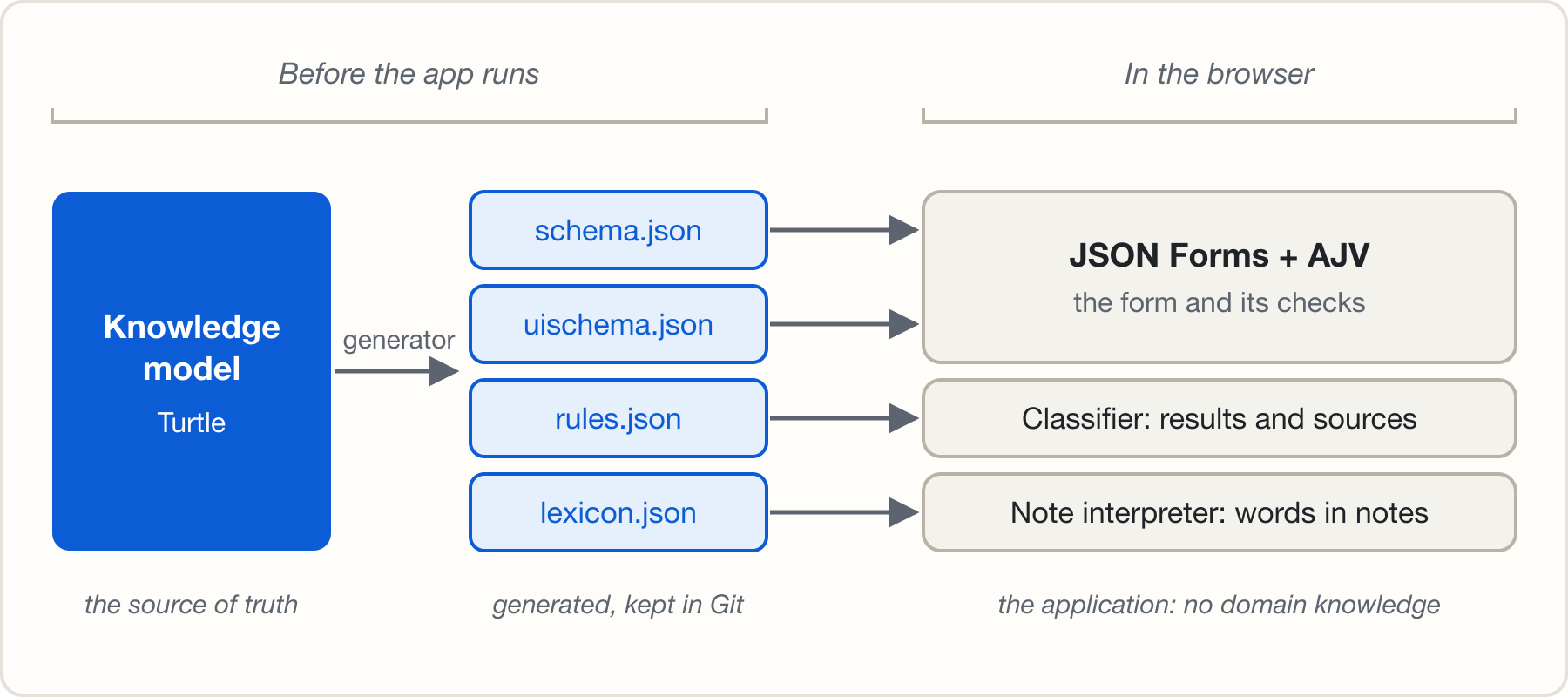
None of this is written in the code of the imci-fever application. Its code is generic: it knows standards such as SHACL and JSON Schema, but nothing about fever or children. A generator, the first part of that generic code, reads the model before the application runs and turns it into files that the rest of the code uses. This article follows the statements of the field through that generator, and shows what each one becomes: an input in the form, a check of the value, a rule, or a word to look for in a note.
Notes came with part 6: instead of filling in the form, a health worker can describe the child in free text. A note interpreter then finds the facts in the note, using the words of the model, and proposes answers for the form, which a person confirms.
The path has three stages:
- The knowledge model: one Turtle file, the single source of truth.
- The generator: about 370 lines of TypeScript. It reads the model and writes four JSON files.
- The application: about 460 lines that read only those JSON files. Two standard libraries do most of the work: JSON Forms draws the form, and AJV checks data against JSON Schema.
JSON Forms in short
JSON Forms is an open-source library, maintained by EclipseSource, that draws a form from two JSON documents:
- A JSON Schema describes the data: each field’s type, limits and choices, and which fields are required.
- A UI schema describes the layout: which fields appear, in which groups or tabs and in which order, and rules that show, hide, enable or disable a field or a whole group depending on the answers.
From these two documents, JSON Forms picks an input for each field (a text box for a number, a checkbox for yes or no, a drop-down list for a choice), keeps the answers, and checks them against the schema with AJV. There are sets of inputs for React, Angular and Vue. The imci-fever application uses the plain HTML inputs for React, plus two additions of its own: tabs that show how many answers each tab has, and errors that appear only after a field was touched.
So the generator does not have to write a form. It only has to write a JSON Schema and a UI schema, and JSON Forms does the rest.
What the generator knows
The generator knows standards and a few terms of its own. It does not know the domain.
- It knows: SHACL (fields, types, limits, groups, order), PROV-O (sources),
SKOS (words), and a small vocabulary for conditions and decision tables
(
shownWhen,allOf,anyOf,atLeast, a table, a row). - It does not know: fever, temperature, malaria, children. No domain term appears in its code, except in comments that give examples.
So the generator never decides that 37.5 °C is a fever. It only knows that a condition can say “this field is at least this number”, and turns that into something the application can check.
One field, through the generator
The field as the model has it today:
[ sh:path imci:axillaryTemperature ; sh:datatype xsd:decimal ;
  sh:group imci:FeverTab ; sh:order 2 ;
  sh:name "Axillary temperature (°C)" ; sh:minInclusive 30 ; sh:maxInclusive 44 ;
  prov:wasDerivedFrom dak:CHE.B6.DE01 ]
What the generator writes for it, in schema.json:
"axillaryTemperature": {
  "type": "number",
  "title": "Axillary temperature (°C)",
  "description": "The child's axillary temperature (temperature taken under the armpit), measured in °C.",
  "minimum": 30,
  "maximum": 44
}
Each statement has one rule in the generator. The sections below take them in turn.
Type, limits, label
const datatypes = { [`${XSD}boolean`]: "boolean", [`${XSD}integer`]: "integer", [`${XSD}decimal`]: "number" };

const choices = o.one(node, `${SH}in`);
const property = choices
  ? { type: "string", enum: o.list(choices).map(literal) }
  : { type: datatypes[o.text(node, `${SH}datatype`)] };
if (!property.type) throw new Error(`The field ${name} has no type`);
property.title = o.text(node, `${SH}name`);
A small table maps each XML Schema type to a JSON Schema type. A list of
choices (sh:in) becomes an enum, which JSON Forms draws as a drop-down
list. sh:minInclusive and sh:maxInclusive become minimum and maximum;
AJV then reports “must be >= 30” for 3.75. sh:minCount 1 becomes required.
A field without a type stops the generator: it does not guess.
Help text from the source
The field has no sh:description, yet the generated field has one. It comes
from the WHO source, through the provenance statement:
prov:wasDerivedFrom dak:CHE.B6.DE01names the data element.- The generator looks it up in the DAK data dictionary, which code extracted from the WHO spreadsheet.
- The first paragraph of the definition becomes the help text.
A sh:description in the model wins over the DAK text. Provenance here is not
only a record: it is how the source’s own words reach the screen.
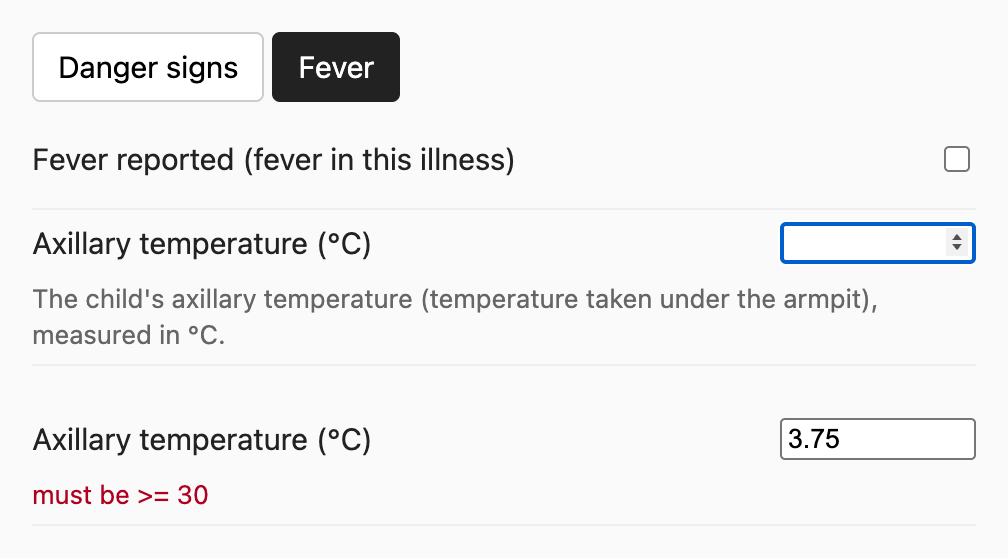
The label, the input, the help text and the error all come from the statements above.
Tabs and order
sh:group and sh:order become the UI schema: a Categorization with one
Category, drawn as a tab, for each group, and the questions in order.
{ "type": "Control", "scope": "#/properties/axillaryTemperature" }When a question is shown
The question “Hot to touch” is shown only without a thermometer:
imci:shownWhen [ imci:field imci:thermometerNotAvailable ; imci:equals true ]The generator turns each condition into JSON Schema. The form data meets the condition when it is valid against that schema:
"rule": { "effect": "SHOW", "condition": { "scope": "#", "schema": {
  "properties": { "thermometerNotAvailable": { "const": true } },
  "required": ["thermometerNotAvailable"] } } }
imci:equals becomes const, imci:atLeast becomes minimum, and allOf,
anyOf and not stay as they are. The required matters: without it, a
field with no answer would meet every condition. The whole compiler is 35
lines.
JSON Forms reads this rule and shows or hides the question. The same condition
also goes to rules.json, so that the classifier ignores an answer to a
question that is hidden.
What the conditions do in the form
In imci-fever, these conditions give the form behaviour that is usually written by hand in the code of the user interface:
- An answer reveals a question. “Convulsions in this illness” reveals how many there were and whether one lasted 15 minutes or longer. “Not able to drink” or “Vomiting everything” reveals the oral fluid test. “No thermometer available” reveals “Hot to touch”.
- A chain of questions. “Fever reported” reveals “Fever for how long?”, and “more than 7 days” reveals whether the fever was present every day.
- A value reveals questions. A temperature of 37.5 °C or more means fever (next section), and fever reveals the fever questions.
- A whole tab. “Skin, mouth and eyes” appears only with fever.
- Combined conditions. The question about travel appears only with fever, no danger sign and a low malaria risk. The malaria test appears only when the rules call for it, and “High parasite density” only after a positive test.
- Required only when asked. The malaria risk needs an answer, but it is asked only with fever.
None of this is code in the application. Each one is a shownWhen statement in
the model.
What a value means
In the model, the fever threshold is stated once, in a named condition:
imci:hasFever a imci:Condition ;
  imci:anyOf ( [ imci:field imci:feverReported ; imci:equals true ]
               [ imci:field imci:hotToTouch ; imci:equals true ]
               [ imci:field imci:axillaryTemperature ; imci:atLeast 37.5 ]
               ... ) .
The generator copies a named condition into every rule that uses it, so
rules.json contains the number 37.5 twenty-five times. That is acceptable for
a generated file: nobody edits it, it is regenerated on every change, and a
test fails if it differs from a fresh generation. The single source of truth
is the model, not the output.
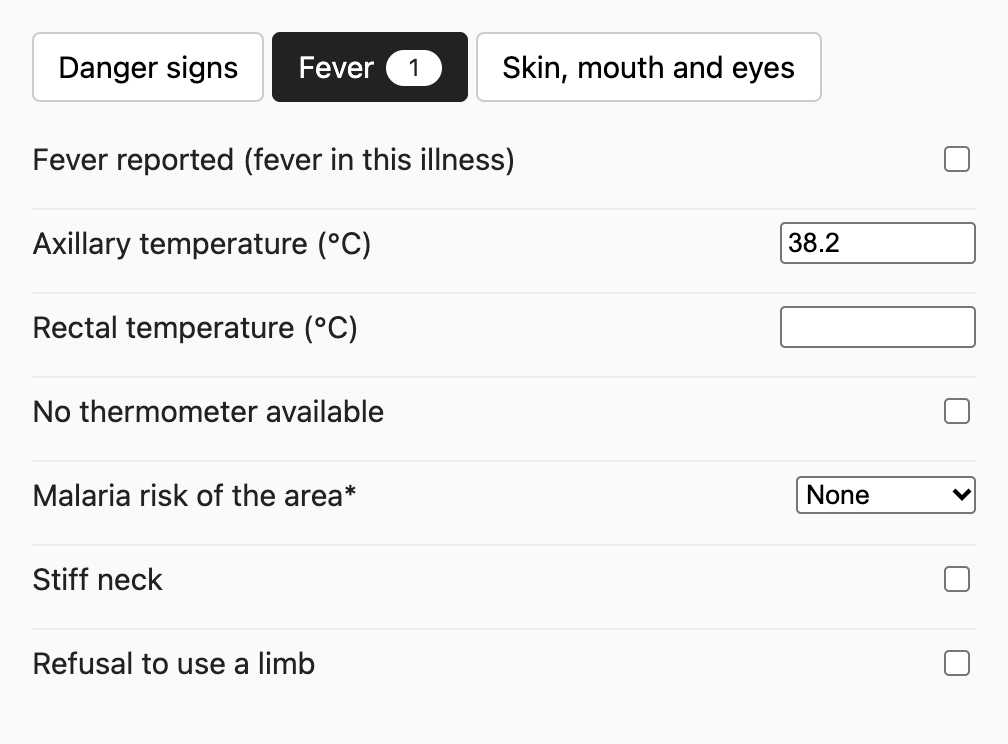
In the running form, a temperature of 38.2 °C meets this condition. The questions that depend on fever appear, and so does a third tab:
The decision tables get one more change. In the model, the first row that
matches wins. In rules.json, each row also says “and no row above matches”,
so the rows exclude each other, and the classifier does not depend on their
order.
Words for notes
For the note interpreter of
part 6,
the generator writes lexicon.json:
"axillaryTemperature": {
  "labels": ["axillary temperature", "axillary", "under the arm", "armpit", ...],
  "definition": "The child's axillary temperature (temperature taken under the armpit), measured in °C."
}
The first label comes from sh:name without the unit; the others are the
skos:altLabel words of the model. The generator also checks the words: a word
already derived from the label, or one that can never match because a note is
split at commas, stops the generation.
Each statement and what it becomes
| Statement in the model | Generated | Used by the application for |
|---|---|---|
sh:path |
Property name | Form, rules and words all refer to it |
sh:datatype, sh:in |
type, enum |
Input control, type check |
sh:minInclusive, sh:maxInclusive |
minimum, maximum |
Error message for an impossible value |
sh:minCount |
required |
A missing answer |
sh:name |
title, first word label |
Question text, note interpreter |
sh:description, or the DAK text through prov:wasDerivedFrom |
description |
Help text, context for the note interpreter |
sh:group, sh:order |
UI schema tabs and order | Layout |
imci:shownWhen |
JSON Forms SHOW rule, shownWhen in rules |
Hiding a question, ignoring its old answer |
| Conditions, tables, rows | JSON Schema per row | Classification |
prov:wasDerivedFrom on rows and treatments |
derivedFrom |
The sources under each result |
skos:altLabel |
labels |
Reading notes |
Why generate, and not read the model at run time
The application could read the Turtle file in the browser. Generating first has three advantages here:
- Standard inputs for standard libraries. JSON Forms and AJV read JSON Schema. They need no knowledge of RDF.
- A reviewable change. Git tracks the generated files. A change to the model shows, in the same review, exactly what changes in the form and the rules.
- Less in the browser. The application loads small JSON files, not an RDF library and a query engine. For rules as simple as these, that is the better trade; richer rules can justify a query engine in the browser.
The cost: the generated formats are less expressive than the model. JSON Schema can test a value against a number; it cannot convert a value measured at any other site of the body to an axillary one. The rule from the previous companion article needs a rule engine that runs SPARQL, in the generator or in the application.
What the generator ignores, and how it grows
The previous companion article, What’s in a field, added statements that the imci-fever application does not use yet: a unit, translations, a maximum count, clinical ranges as data. The generator reads only what it knows and ignores the rest, so these additions break nothing. Each one becomes useful with one more mapping, not with a change to the application:
- Translations: write one label per language, under the keys that JSON
Forms uses for translations (
axillaryTemperature.label), and let the application choose the language. - Unit: add it to the title in the language of the form, instead of writing “(°C)” by hand in each label.
- Clinical ranges: a rule engine derives the range from the data, as shown in the previous companion article.
This is the same monotonic growth, one level down: the model grows by adding statements, and the generator grows by adding mappings.
Is it really domain-agnostic?
Mostly. The generator and the classifier contain no knowledge of fever. Two limits remain:
- The vocabulary for conditions and tables has the
imci:prefix. The terms are generic (a condition, a table, a row), but their names still carry the demo’s name. - Two messages in the application still name fever, for example “the fever chart does not apply”. They belong in the model.
The vocabulary for conditions is small on purpose: a field equals a value, a
field is at least a number, and allOf, anyOf and not. That is enough for
this guideline, and it translates to JSON Schema. Richer rules, such as the
conversion between measurement sites, need more. Rather than growing its own
language (see below), a model can state them in SPARQL, a standard with
existing engines.
A second domain is the real test: a new Turtle file, the same generator, the same application. A later article in this series builds one, with its rules in SPARQL.
How we’d know it’s wrong
- The generator grows branches for special cases of one domain.
- The vocabulary for conditions grows into a programming language that only engineers can read.
- Someone edits a generated file by hand, and the change is lost at the next generation.
- Too much of the knowledge needs features that the generated formats cannot express, and ends up in application code.
The ideas and arguments in this article are my own. An AI assistant (Claude) helped with drafting, editing and fact-checking. The example is adapted from the WHO digital adaptation kit for child health (CC BY-NC-SA 3.0 IGO); WHO did not create the adaptation and is not responsible for it.